Showing posts with label survey. Show all posts

Sunday, November 22, 2015

Changes in Google Forms

If you go to make a Google Form now, you'll notice that you're prompted to try the new Google Forms.  It's quite a different look.  I just made my first form with the new version.  Overall, I like the new interface.  It's a cleaner look; rather than presenting all options at all times, it keeps things hidden until you need them.  The only thing I see to be missing at this point are Add-ons, but in my experience, those are not widely used at CVU.  I expect that they will be re-created for this new version of Forms and will start to re-appear.  Themes are also handled differently.

I was going to make a video explaining the new features, but I found this excellent one already done (from Guildway.com).

One thing mentioned in the video is that data validation (checking to see that an answer is a number, for example) is not available in the new Forms.  This has been added back in since.

I'd love to hear what people think of the new Forms.  I'd be happy to help teachers and students get started with these.

Tuesday, May 5, 2015

Students creating surveys


Students creating surveys and sending them out is an excellent way to work with real data in the classroom.  How can we do this effectively (so that people actually answer the survey)? This document has detailed tips and outlines a process for getting surveys approved. If you're interested in getting your students started with surveys (or would like to create one yourself), let me know!

Monday, January 5, 2015

Happy New Year!


Welcome to 2015!  


I'd like to announce a new model for technology workshops at CVU starting semester 2. Every Thursday will be drop-in work time during the first half of each block.  I will have my office (127) set up with laptops and tables.

I will announce the topic for each week.  If you have something in particular that you'd like to work on or learn, please let me know and I'll put it on the list.

Topic for January 15 (at 8:15, 10:45 and 1:00 on this exam day rescheduled to 1:30):
Closing out your Moodle page for semester 1 and getting set for semester 2

Topic for January 22:
Save a Tree-- Assigning, collecting and giving feedback without paper.

Topic for January 29:
Checking in-- Making questionnaires, surveys, and exit cards.

Thursday, May 22, 2014

End of course surveys in Moodle

Teachers,


As in the past, there is now a template in Moodle that you can copy (and edit, if desired) to create an anonymous end-of-course instructional feedback survey.

Here’s how:

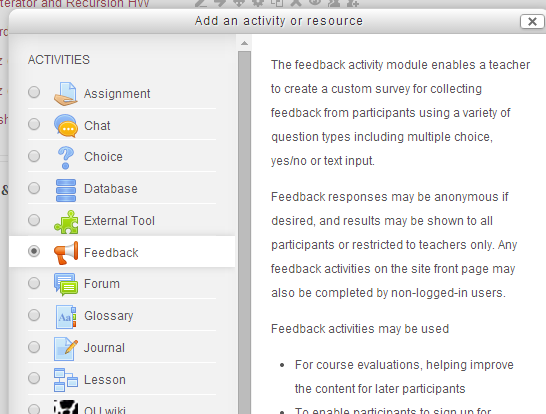
1. Turn editing on and create a new activity in your course.  Choose “Feedback.”

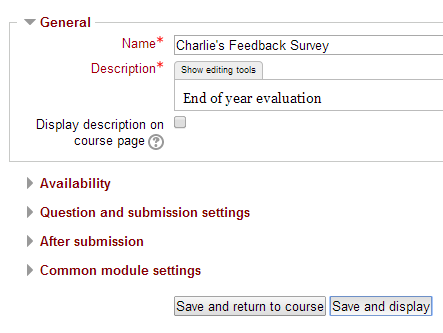
2. Name and describe it however you like. Then click Save and Display
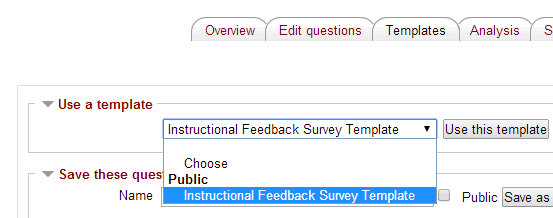
3. Click the Templates tab at the top, choose “Instructional Feedback Survey Template” in the pulldown menu and click “Use this template.”


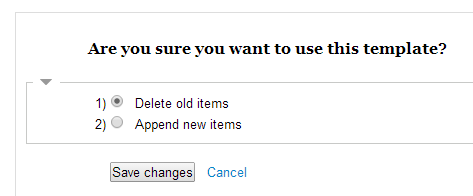
4. On the next screen, just click “Save changes.”

5. You will now see the default survey questions from past years.  You may add your own items, as desired (by clicking the Select pull-down menu).

Questions? See Charlie in 127.

Thanks.

Friday, June 7, 2013

Great New Features in Google Forms

Many teachers and students use Google Forms to create surveys.  Google Forms just got even better with the addition of two features:

  1. You can now put images into Google Forms.  This is something that people often ask about, and it's finally here.  When you're making the form, just go to Add Item...Image.
  2. You can now paste a list into the first choice for multiple choice questions, and Google will break the list into separate choices. I found a list of the presidents, copied it, and pasted into choice 1 for the first question.

Wednesday, February 20, 2013

Google Forms

Google Forms has a new look.  If you're unfamiliar with Google Forms, it's the survey/questionnaire tool in Google Drive/Docs.  A Google Form is a very easy way to collect information.

For those who have used Google Forms before, here are the two important updates:

  • You can now collaborate on authoring a form (just like any other Google Doc).
  • You can now specify the destination for the responses.  This will create a spreadsheet file that is separate from the form itself (it used to confuse people when they were the same file).


If you'd like help getting started with Google Forms, please let me know!

Tuesday, February 5, 2013

New Google Forms Editor

The next time you go to make a new Google Form, you will likely notice that there have been some changes to the editor.  The most significant changes are:


  • You can now choose whether the responses to the form go into a spreadsheet (as they have in the past) or whether they are kept in the form itself.  
  • You can now collaborate on a form, just as you would on any other Google doc.
I just used the new editor myself,  and I like the changes.  Please let me know if you need any help with the new editor.  

Wednesday, October 31, 2012

Moodle "choice" activity

(Originally posted 1/6/11)

Looking for an easy way to let your students vote? Try using the "Choice" module (under "Add an Activity") in Moodle. It only takes a minute to set up. Of course, you can also use Google forms and other online tools to take a vote, but one nice feature of the Moodle choice is that you know who has and hasn't yet participated.

The results look like this (whether students see the results and whether there is a limit for each choice are optional settings):

results

Here's a video on how to set it up:
http://www.youtube.com/watch?v=P9Ynqdv6MHc
I would love to help anyone get started with this- just let me know.

Cell phone surveys

(Originally posted 3/1/11)

At the last faculty meeting, we used a web site that allowed people to text their responses to a prompt and projected the results. You may have thought that such a thing is difficult to pull off. In fact, it's quite easy- and it's free (for up to 30 responses per question). The site is http://www.polleverywhere.com/ .

There are some things to consider when using this site, however:
1) Equity. Many kids have cell phones with unlimited text plans, but not all. One nice thing about polleverywhere is that they provide a URL for submission over the web. Students without cell phones (or with smartphones) can use this, instead.

2) Anonymity. You don't know who is submitting which response, so a conversation about appropriateness is probably a good idea beforehand.

You can create multiple-choice or text questions. You can also download the results afterward for future reference.