Showing posts with label feedback. Show all posts

Thursday, September 12, 2019

Using screencasting for feedback

Do you ever wish you could just talk through and annotate student work to provide feedback (rather than all that writing)?  Well, you can.  I made a short video on how to use Screencastify to do just that.  Screencastify is a Chrome extension that should already be installed for you (if not, it only takes a minute).

Check it out here and please let me know how I can help you get started.


https://youtu.be/5-_SDyn9Tdw


Monday, May 16, 2016

New Q&A feature in Google Slides

Google Slides (formerly Google Presentations) recently got a great update that's worth checking out. You can now collect audience questions using something called Q&A.  Essentially, while you're presenting, audience members post questions to a link you provide.  Other audience members can then vote up a a question.  At any point, you can see which questions have a lot of votes and reply to them.

This is a great way to involve the audience (even the shy people who might never raise their hand) and filter for questions that have a lot of interest.


Here's a video of Q&A in action (featuring the winner of the first Google Science Fair)


Thursday, May 22, 2014

End of course surveys in Moodle

Teachers,


As in the past, there is now a template in Moodle that you can copy (and edit, if desired) to create an anonymous end-of-course instructional feedback survey.

Here’s how:

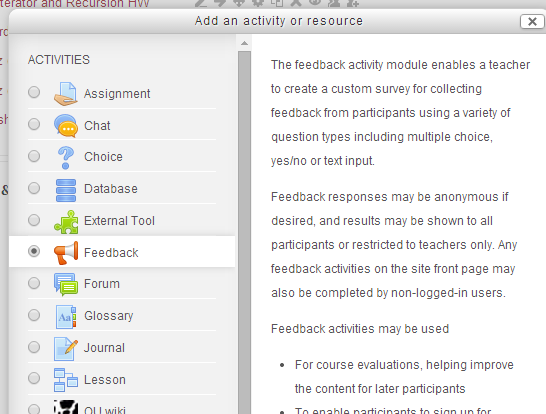
1. Turn editing on and create a new activity in your course.  Choose “Feedback.”

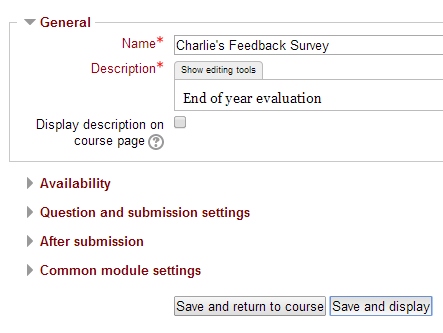
2. Name and describe it however you like. Then click Save and Display
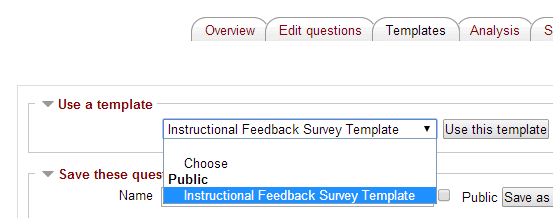
3. Click the Templates tab at the top, choose “Instructional Feedback Survey Template” in the pulldown menu and click “Use this template.”


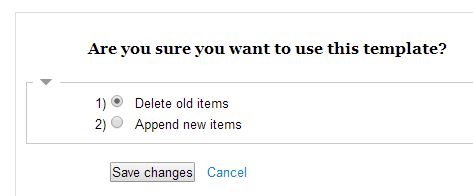
4. On the next screen, just click “Save changes.”

5. You will now see the default survey questions from past years.  You may add your own items, as desired (by clicking the Select pull-down menu).

Questions? See Charlie in 127.

Thanks.