Need some inspiration? Here are two videos showing digital learning at CVU.
First, what some students are doing:
And some tips from teachers:
Showing posts with label teacher. Show all posts
Showing posts with label teacher. Show all posts
Wednesday, May 8, 2019


Friday, December 11, 2015
National Education Technology Plan
The new National Education Technology Plan for 2016 was released today. In their words:
For the TLDR version, the plan is summarized in the conclusion.
"The National Education Technology Plan is the flagship educational technology policy document for the United States. The 2016 Plan, Future Ready Learning: Reimagining the Role of Technology in Education, articulates a vision of equity, active use, and collaborative leadership to make everywhere, all-the-time learning possible. While acknowledging the continuing need to provide greater equity of access to technology itself, the plan goes further to call upon all involved in American education to ensure equity of access to transformational learning experiences enabled by technology. The principles and examples provided in this document align to the Innovative Technology Expands Children’s Horizons (ITECH) program as authorized by Congress in December 2015 through the Every Child Achieves Act."
For the TLDR version, the plan is summarized in the conclusion.
Thursday, May 22, 2014
End of course surveys in Moodle
Teachers,
As in the past, there is now a template in Moodle that you can copy (and edit, if desired) to create an anonymous end-of-course instructional feedback survey.
Here’s how:
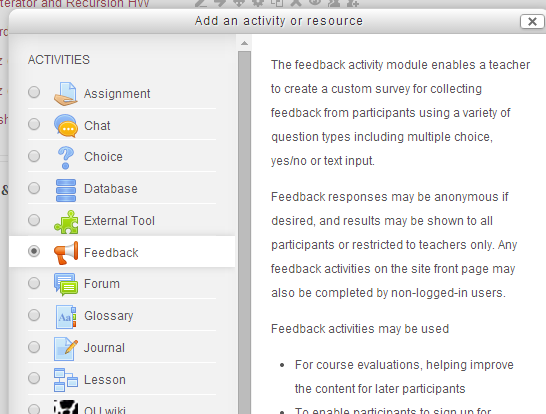
1. Turn editing on and create a new activity in your course. Choose “Feedback.”
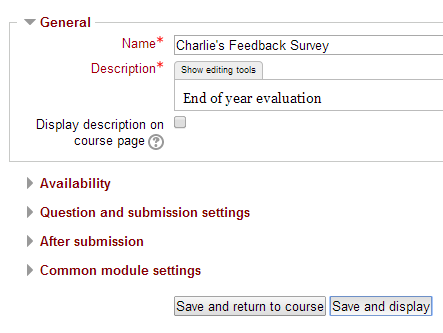
2. Name and describe it however you like. Then click Save and Display
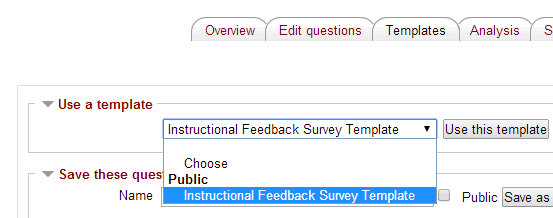
3. Click the Templates tab at the top, choose “Instructional Feedback Survey Template” in the pulldown menu and click “Use this template.”
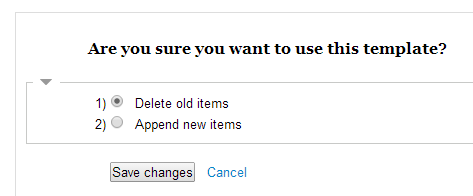
4. On the next screen, just click “Save changes.”
5. You will now see the default survey questions from past years. You may add your own items, as desired (by clicking the Select pull-down menu).

Questions? See Charlie in 127.
Thanks.
Tuesday, March 4, 2014
3/3/14 Faculty Meeting
Dear teachers,
Here is the presentation from the faculty meeting yesterday for you review. Please note that you need to be signed into your CVU GMail (or Moodle) to view the presentation:
https://drive.google.com/a/cvuhs.org/file/d/0B1K_ByAqaFKGaXR1aXVic2JtOTQ/edit?usp=sharing
Here is the presentation from the faculty meeting yesterday for you review. Please note that you need to be signed into your CVU GMail (or Moodle) to view the presentation:
https://drive.google.com/a/cvuhs.org/file/d/0B1K_ByAqaFKGaXR1aXVic2JtOTQ/edit?usp=sharing
Thursday, June 13, 2013
Converting to Moodle 2
We are in the process of updating Moodle to the latest version (2.5).
Here is important information for teachers and students.
Teachers, here's something nice about the new version-- you can now drag and drop files into your course. No need to upload a file and then create a link to it!
Here is important information for teachers and students.
Teachers, here's something nice about the new version-- you can now drag and drop files into your course. No need to upload a file and then create a link to it!
Thursday, June 6, 2013
Vermont Fest seeking presenters
How did you and your students use technology this year? Do you have a success story you'd like to share? Vermont Fest, the educational technology conference held each fall, is seeking presenters for next year. Workshops that are presented by teachers are especially powerful, as other teachers can see how a technique or tool worked in a class. I'd be happy to assist you prepare a presentation. Presenters also attend the conference for free on the day they present. Interested? Read more here.
Thursday, May 30, 2013
Summer Opportunities for Teachers
Here are a few opportunities I've noticed for developing tech integration ideas this summer:
RETN is offering a course on harnessing the power of digital video in the classroom (this appeared in the latest Field Memo for the VT Agency of Ed).
Google is offering a free on-line course on Google Earth and Google Maps. It starts June 10th (during exams, unfortunately), but it's self-paced, so you can probably jump in when ready. It goes until June 24th. There are lots of great uses of Google Maps/Earth in the classroom. Here's one example from CVU (look at #2).
Know of others that you want to share? The easiest way to comment is to select "Name/URL" where it says "Comment As:". Then just enter your name (a URL is not necessary).
RETN is offering a course on harnessing the power of digital video in the classroom (this appeared in the latest Field Memo for the VT Agency of Ed).
Google is offering a free on-line course on Google Earth and Google Maps. It starts June 10th (during exams, unfortunately), but it's self-paced, so you can probably jump in when ready. It goes until June 24th. There are lots of great uses of Google Maps/Earth in the classroom. Here's one example from CVU (look at #2).
Know of others that you want to share? The easiest way to comment is to select "Name/URL" where it says "Comment As:". Then just enter your name (a URL is not necessary).
Thursday, April 18, 2013
Using a blog to prompt student discussion
For his wellness classes, Troy created a blog with links to articles about recent events that he wants his students to discuss. Students post comments anonymously. Take a look:

I was in the room as students were reading and reacting to some of these articles and the engagement was high.
Having students create and update their own blogs is also a powerful way to make writing meaningful for them. Teachers whose students blog report improvement in both their writing and their engagement.
There are many tools available for blogging. Probably the easiest to get started with is Blogger (or Blogspot), which is part of Google Apps for Education (this is what Troy used). You can find Blogger by clicking "More" while in gMail.
Here are a few articles if you'd like to read some more:
Wednesday, March 13, 2013
Teachers using Technology
Here are two ways that CVU teachers have used technology for instruction in their classes recently:
When Peter Booth was absent from his math class, he used EduCreations on his iPad to prepare his lesson for his students. EduCreations allows you to narrate while you write, draw and manipulate images on your iPad. Peter's substitute than played back the recorded lesson the classroom computer. Students said afterwards that they found it enjoyable and helpful to have the lesson taught by Peter, even when he was out. Here's the lesson:
http://www.educreations.com/lesson/view/geometry-sub-plans-arc-length/5542446/?ref=link
During her science class, Sarah Strack needed to check for understanding from students. She used PollEverywhere, which allows students to use cell phones, laptops, tablets--basically, any device-- to provide answers to a question or poll. She used AirServer (wirelessly sends your iPad or Mac screen to the projector) to project the poll from her iPad. Compare this to asking students, "Does everyone get it?" Here are the students' responses to one question.:

When Peter Booth was absent from his math class, he used EduCreations on his iPad to prepare his lesson for his students. EduCreations allows you to narrate while you write, draw and manipulate images on your iPad. Peter's substitute than played back the recorded lesson the classroom computer. Students said afterwards that they found it enjoyable and helpful to have the lesson taught by Peter, even when he was out. Here's the lesson:
http://www.educreations.com/lesson/view/geometry-sub-plans-arc-length/5542446/?ref=link
During her science class, Sarah Strack needed to check for understanding from students. She used PollEverywhere, which allows students to use cell phones, laptops, tablets--basically, any device-- to provide answers to a question or poll. She used AirServer (wirelessly sends your iPad or Mac screen to the projector) to project the poll from her iPad. Compare this to asking students, "Does everyone get it?" Here are the students' responses to one question.:
Subscribe to:
Posts (Atom)