Friday, September 5, 2014

Updates to Google Apps

Here are some changes you'll notice soon in Google Apps:


  1. It's now easier to share a document, presentation, or sheet with someone.  When you click share, you will (soon) see a button that says "Get shareable link."  This link automatically gives viewing rights to anyone you send it to.
  2. Google Forms now lets you create a custom theme.  That's just plain fun-- and it lets you decide you want your form to look!
  3. Need to insert a special character (like a non-Latin character or an arrow) into your doc?  Go to the Insert menu. You can even draw the character you want to use and it will search for you. 


Thursday, June 12, 2014

Adding Google Docs to Multiple Folders

Q: Can I add a single Google Doc to more than one folder?
A: Yes!  Rather than dragging the file into a folder, check the box next to the file, then click the folder icon at the top.  Hold down the Ctrl key (Windows) or Command key (Mac) as you check each folder to add the doc to.


Note that you are not making copies of the file when doing this.  It is the same document going into each folder, so any changes you make in one place will carry over to the others.

Wednesday, June 11, 2014

Resetting Your Moodle Course

Teachers,
Before starting a new term, you may want to clean up the content in your courses.

  • You can hide activities (or entire topics) from view by clicking the "eye" icon.  
  • You can also delete items entirely with the "X" icon.

You can also "reset" your course, as follows:
If you want to keep a forum, database, feedback, or other activity but delete the posts or data in that activity (essentially, "clear it out"), you can use the Reset feature of Moodle.

Click "Reset" under Administration, then choose the activities from which to clear data.


Wednesday, June 4, 2014

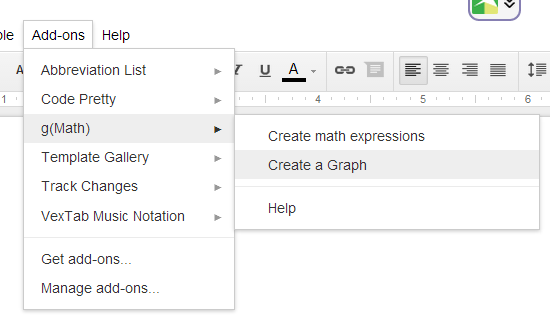
gMath creates graphs in Google Docs

Need to insert a mathematical graph into a Google doc?  Now you can, without having to copy and paste.  Try the gMath add-on for Google Drive (go to Add-ons...Get add-ons, then search for it) . One limitation is that it only graphs from -10 to 10 in both x and y.


 It also has an equation editor, but that requires LaTeX, which is harder than just using the built-in equation editor (Go to Insert..Equation).

Also, there is now the ability to insert graphs into Google spreadsheets and forms, which could be useful to create an assessment.

Wednesday, May 28, 2014

Simple animation technique for presentations

When creating a series of slides in Powerpoint, Google Presentations/Slides, Keynote, etc., it is often effective to have elements appear one at a time (as opposed to all at once).  These applications have the ability to apply those kinds of animations on slides, but there's another very easy way to accomplish the same effect.
  • Create the final version of the slide (with all the text, images, etc. on it)
  • Make several copies of that slide 
  • Moving back through the slides, selectively remove elements
Here it is in action:


And here is a very short screencast on how to do it: